First steps with the plugin
Initialize kedro-mlflow
First, you need to initialize your project and add the plugin-specific configuration file with this command:
kedro mlflow init
You will see the following message:
'conf/local/mlflow.yml' successfully updated.
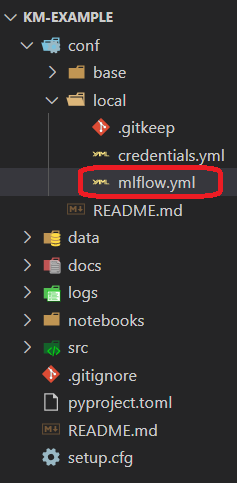
The conf/local folder is updated and you can see the mlflow.yml file:
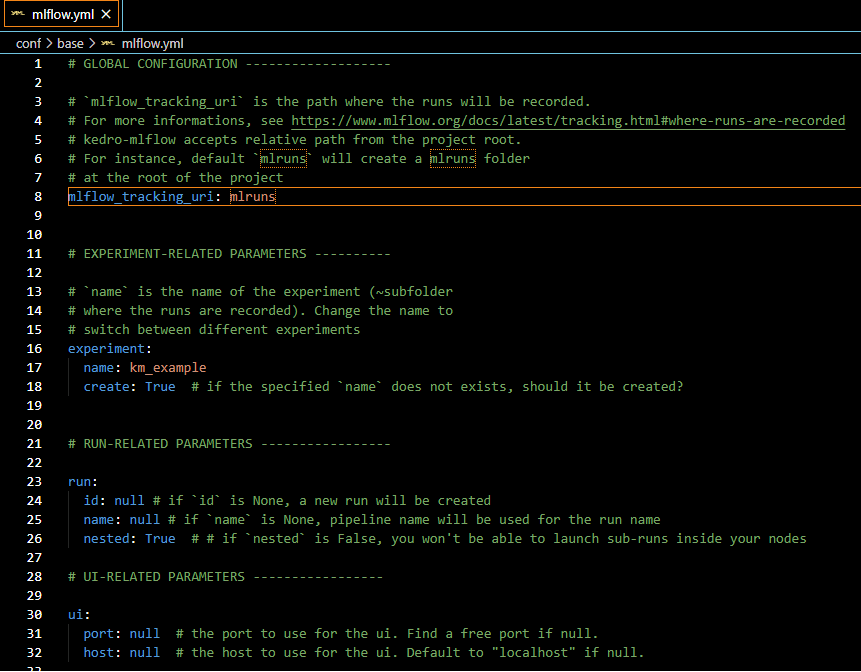
Optional: If you have configured your own mlflow server, you can specify the tracking uri in the mlflow.yml (replace the highlighted line below):
Run the pipeline
Open a new command and launch
kedro run
If the pipeline executes properly, you should see the following log:
2020-07-13 21:29:25,401 - kedro.io.data_catalog - INFO - Loading data from `example_iris_data` (CSVDataset)...
2020-07-13 21:29:25,562 - kedro.io.data_catalog - INFO - Loading data from `params:example_test_data_ratio` (MemoryDataset)...
2020-07-13 21:29:25,969 - kedro.pipeline.node - INFO - Running node: split_data([example_iris_data,params:example_test_data_ratio]) -> [example_test_x,example_test_y,example_train_x,example_train_y]
2020-07-13 21:29:26,053 - kedro.io.data_catalog - INFO - Saving data to `example_train_x` (MemoryDataset)...
2020-07-13 21:29:26,368 - kedro.io.data_catalog - INFO - Saving data to `example_train_y` (MemoryDataset)...
2020-07-13 21:29:26,484 - kedro.io.data_catalog - INFO - Saving data to `example_test_x` (MemoryDataset)...
2020-07-13 21:29:26,486 - kedro.io.data_catalog - INFO - Saving data to `example_test_y` (MemoryDataset)...
2020-07-13 21:29:26,610 - kedro.runner.sequential_runner - INFO - Completed 1 out of 4 tasks
2020-07-13 21:29:26,850 - kedro.io.data_catalog - INFO - Loading data from `example_train_x` (MemoryDataset)...
2020-07-13 21:29:26,851 - kedro.io.data_catalog - INFO - Loading data from `example_train_y` (MemoryDataset)...
2020-07-13 21:29:26,965 - kedro.io.data_catalog - INFO - Loading data from `parameters` (MemoryDataset)...
2020-07-13 21:29:26,972 - kedro.pipeline.node - INFO - Running node: train_model([example_train_x,example_train_y,parameters]) -> [example_model]
2020-07-13 21:29:27,756 - kedro.io.data_catalog - INFO - Saving data to `example_model` (MemoryDataset)...
2020-07-13 21:29:27,763 - kedro.runner.sequential_runner - INFO - Completed 2 out of 4 tasks
2020-07-13 21:29:28,141 - kedro.io.data_catalog - INFO - Loading data from `example_model` (MemoryDataset)...
2020-07-13 21:29:28,161 - kedro.io.data_catalog - INFO - Loading data from `example_test_x` (MemoryDataset)...
2020-07-13 21:29:28,670 - kedro.pipeline.node - INFO - Running node: predict([example_model,example_test_x]) -> [example_predictions]
2020-07-13 21:29:29,002 - kedro.io.data_catalog - INFO - Saving data to `example_predictions` (MemoryDataset)...
2020-07-13 21:29:29,248 - kedro.runner.sequential_runner - INFO - Completed 3 out of 4 tasks
2020-07-13 21:29:29,433 - kedro.io.data_catalog - INFO - Loading data from `example_predictions` (MemoryDataset)...
2020-07-13 21:29:29,730 - kedro.io.data_catalog - INFO - Loading data from `example_test_y` (MemoryDataset)...
2020-07-13 21:29:29,911 - kedro.pipeline.node - INFO - Running node: report_accuracy([example_predictions,example_test_y]) -> None
2020-07-13 21:29:30,056 - km_example.pipelines.data_science.nodes - INFO - Model accuracy on test set: 100.00%
2020-07-13 21:29:30,214 - kedro.runner.sequential_runner - INFO - Completed 4 out of 4 tasks
2020-07-13 21:29:30,372 - kedro.runner.sequential_runner - INFO - Pipeline execution completed successfully.
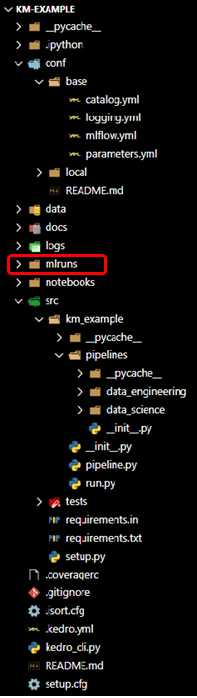
Since we have kept the default value of the mlflow.yml, the tracking uri (the place where runs are recorded) is a local mlruns folder which has just been created with the execution:
Open the UI
Launch the ui:
kedro mlflow ui
And open the following adress in your favorite browser
http://localhost:5000/
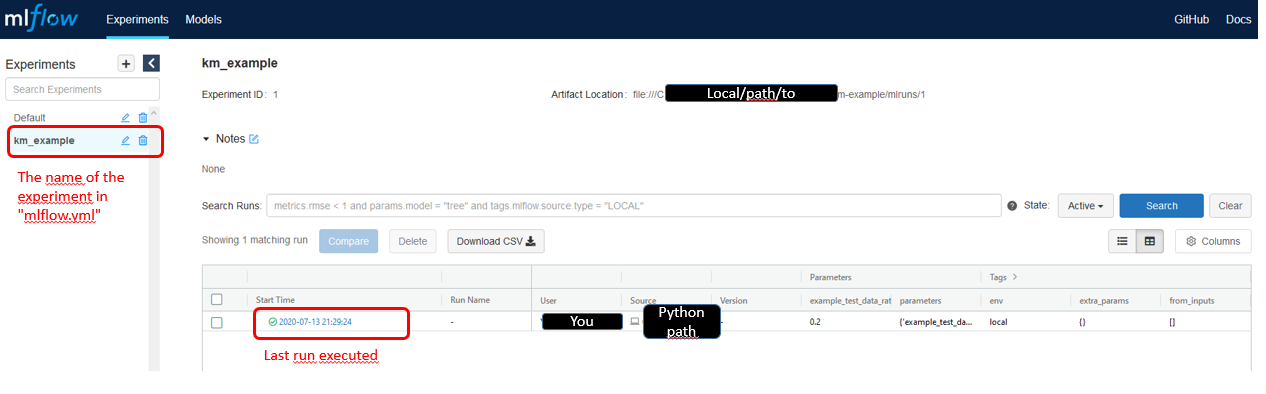
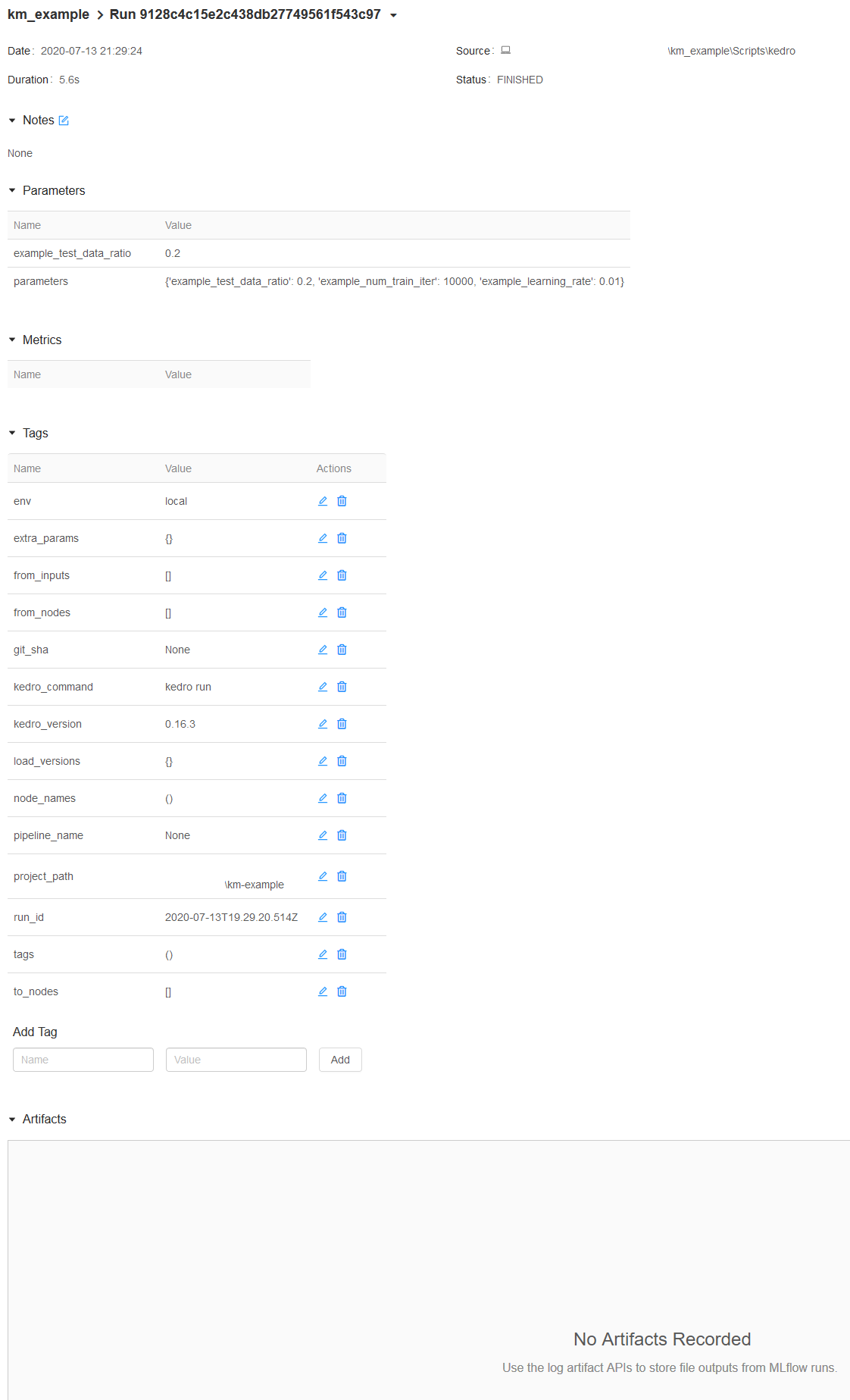
Click now on the last run executed, you will land on this page:
Parameters versioning
Note that the parameters have been recorded automagically. Here, two parameters format are used:
The parameter
example_test_data_ratio, which is called in thepipeline.pyfile with theparams:prefixthe dictionary of all parameters in
parameters.ymlwhich is a reserved key word inKedro. Note that this is bad practice because you cannot know which parameters are really used inside the function called. Another problem is that it can generate too long parameters names and lead to mlflow errors.
You can see that these are effectively the registered parameters in the pipeline with the kedro-viz plugin:
pip install kedro-viz
kedro viz
Open your browser at the following adress:
You should see the following graph:
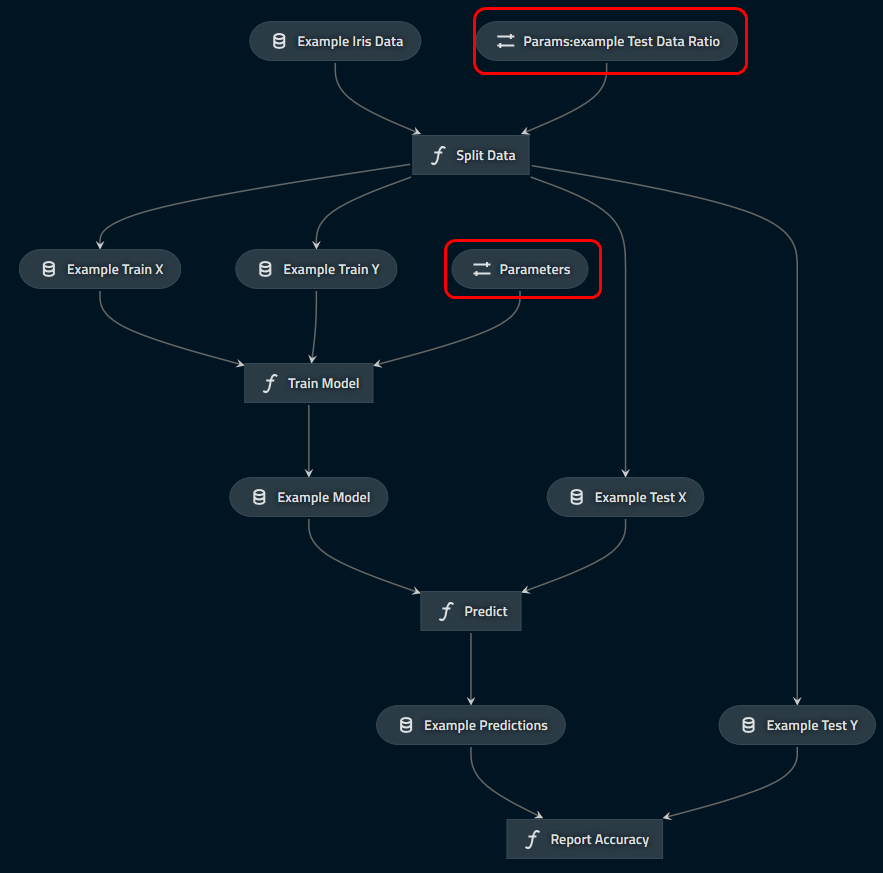
which indicates clearly which parameters are logged (in the red boxes with the “parameter” icon).
Journal information
The informations provided by the Kedro’s Journal are also recorded as tags in the mlflow ui in order to make reproducible. In particular, the exact command used for running the pipeline and the kedro version used are stored.
Artifacts
With this run, artifacts are empty. This is expected: mlflow does not know what it should log and it will not log all your data by default. However, you want to save your model (at least) or your run is likely useless!
First, open the catalog.yml file which should like this:
# This is a data set used by the "Hello World" example pipeline provided with the project
# template. Please feel free to remove it once you remove the example pipeline.

example_iris_data:
  type: pandas.CSVDataset
  filepath: data/01_raw/iris.csv
And persist the model as a pickle with the MlflowArtifactDataset class:
# This is a data set used by the "Hello World" example pipeline provided with the project
# template. Please feel free to remove it once you remove the example pipeline.

example_iris_data:
  type: pandas.CSVDataset
  filepath: data/01_raw/iris.csv

example_model:
  type: kedro_mlflow.io.artifacts.MlflowArtifactDataset
  dataset:
    type: pickle.PickleDataset
    filepath: data/06_models/trained_model.pkl
Rerun the pipeline (with kedro run), and reopen the UI. Select the last run and see that the file was uploaded:

This works for any type of file (including images with MatplotlibWriter) and the UI even offers a preview for png and csv, which is really convenient to compare runs.
Note: Mlflow offers specific logging for machine learning models that may be better suited for your use case, see MlflowModelTrackingDataset
Going further
Above vanilla example is just the beginning of your experience with kedro-mlflow. Check out the next sections to see how kedro-mlflow:
offers advanced capabilities for machine learning versioning
can help to create standardize pipelines for deployment in production